



UX Framework
Use complex applications simply and consistently throughout
Different interaction concepts make everyday work more difficult
Product development, project management, production, and service bring together complex data, processes, and diverse user groups. Changing interaction concepts across applications increase the effort required to navigate them and make it particularly difficult for occasional users to get started. At the same time, teams expect information to be clearly accessible regardless of the device they use. Software deployed internationally must also accommodate language differences and provide clear, understandable documentation. A common UX foundation provides the basis for keeping this complexity manageable.
Your benefits
- Use applications intuitively with consistent interaction patterns
- Access product and process information conveniently across different devices
- Ensure a consistent user experience with standardized design components
- Provide clear and consistent application documentation
- Reduce language barriers for international users

Use applications consistently and intuitively

Complex enterprise applications become easier to use when familiar interaction patterns are repeated across different tasks and functional areas. The InSync Design System provides the common UX foundation for CONTACT Elements. Standardized design components, best practices, and guidelines ensure a consistent look and feel and recognizable interactions. This helps users navigate different applications more quickly and understand complex product and process information at a glance. At the same time, InSync provides a shared design foundation for CONTACT, partners, and OEMs.
Use applications consistently and intuitively
Complex enterprise applications become easier to use when familiar interaction patterns are repeated across different tasks and functional areas. The InSync Design System provides the common UX foundation for CONTACT Elements. Standardized design components, best practices, and guidelines ensure a consistent look and feel and recognizable interactions. This helps users navigate different applications more quickly and understand complex product and process information at a glance. At the same time, InSync provides a shared design foundation for CONTACT, partners, and OEMs.

Complex enterprise applications become easier to use when familiar interaction patterns are repeated across different tasks and functional areas. The InSync Design System provides the common UX foundation for CONTACT Elements. Standardized design components, best practices, and guidelines ensure a consistent look and feel and recognizable interactions. This helps users navigate different applications more quickly and understand complex product and process information at a glance. At the same time, InSync provides a shared design foundation for CONTACT, partners, and OEMs.
Use complex applications comfortably on any device

Work contexts change – from the office workstation to working on the go. CONTACT Elements’ responsive web design ensures that user interfaces adapt to different screen sizes and devices. Content and controls remain clearly structured while the underlying interaction concept stays consistent. This allows users to rely on familiar interaction patterns even when switching devices and to work comfortably with product and project data. In this way, the UX Framework supports seamless digital workflows across different usage scenarios.

Use complex applications comfortably on any device
Work contexts change – from the office workstation to working on the go. CONTACT Elements’ responsive web design ensures that user interfaces adapt to different screen sizes and devices. Content and controls remain clearly structured while the underlying interaction concept stays consistent. This allows users to rely on familiar interaction patterns even when switching devices and to work comfortably with product and project data. In this way, the UX Framework supports seamless digital workflows across different usage scenarios.
Work contexts change – from the office workstation to working on the go. CONTACT Elements’ responsive web design ensures that user interfaces adapt to different screen sizes and devices. Content and controls remain clearly structured while the underlying interaction concept stays consistent. This allows users to rely on familiar interaction patterns even when switching devices and to work comfortably with product and project data. In this way, the UX Framework supports seamless digital workflows across different usage scenarios.
Ensure a consistent user experience with a shared UX foundation
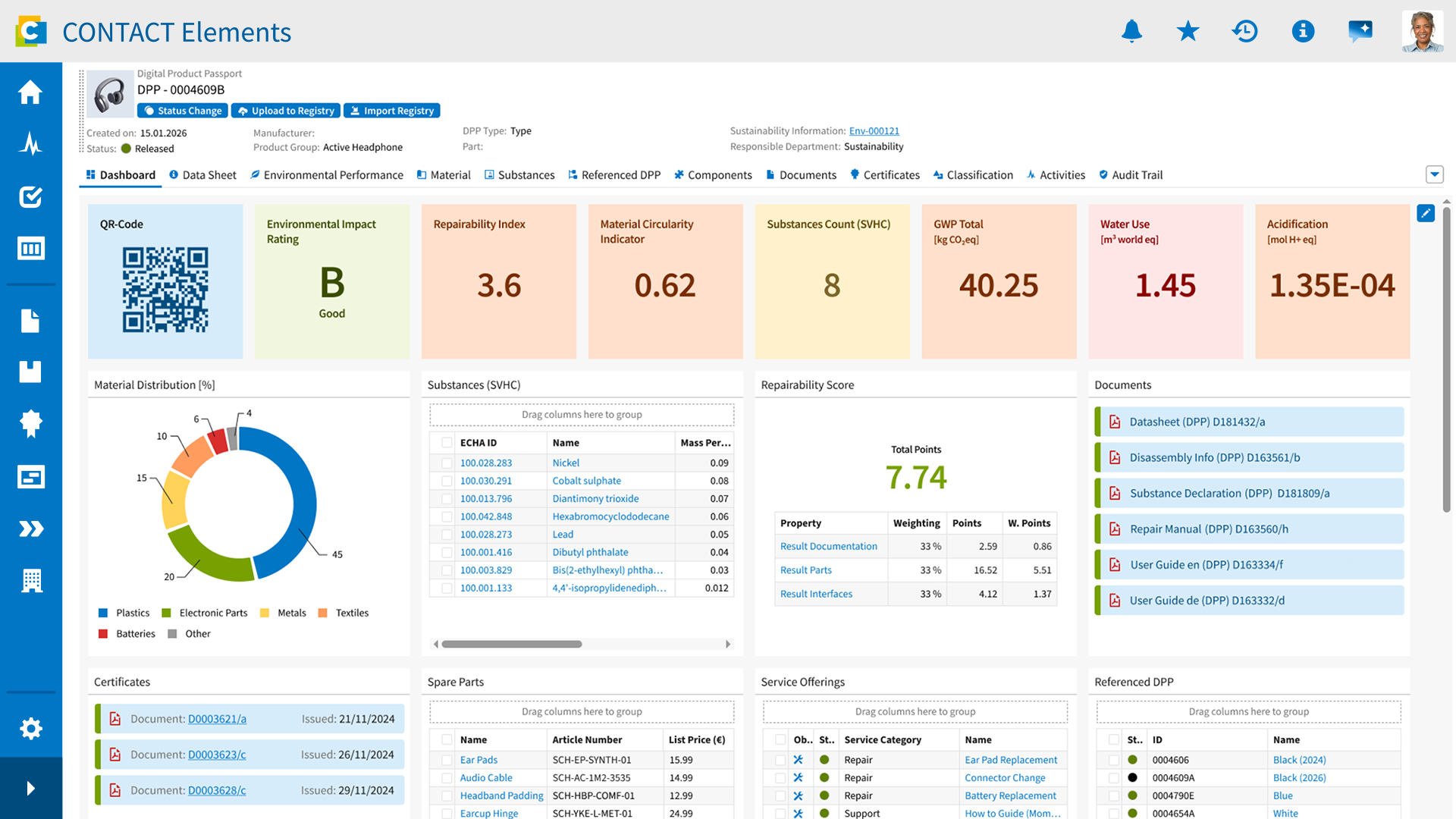
A consistent user experience starts long before an application is finished. The InSync Design System provides methods, standardized design components, and templates that enable interfaces to be designed consistently from the outset. Mockups and prototypes can be created, evaluated, and refined on this shared foundation. This ensures that new or customized applications follow the same interaction principles as the rest of the CONTACT Elements environment. It supports the consistent evolution of the platform and helps prevent different applications from developing divergent interaction concepts.
Ensure a consistent user experience with a shared UX foundation
A consistent user experience starts long before an application is finished. The InSync Design System provides methods, standardized design components, and templates that enable interfaces to be designed consistently from the outset. Mockups and prototypes can be created, evaluated, and refined on this shared foundation. This ensures that new or customized applications follow the same interaction principles as the rest of the CONTACT Elements environment. It supports the consistent evolution of the platform and helps prevent different applications from developing divergent interaction concepts.
A consistent user experience starts long before an application is finished. The InSync Design System provides methods, standardized design components, and templates that enable interfaces to be designed consistently from the outset. Mockups and prototypes can be created, evaluated, and refined on this shared foundation. This ensures that new or customized applications follow the same interaction principles as the rest of the CONTACT Elements environment. It supports the consistent evolution of the platform and helps prevent different applications from developing divergent interaction concepts.
Provide clear and consistent documentation

A good user experience does not end at the user interface. Users and partners need clear information to use applications confidently and get the most out of CONTACT Elements. With the InForm Documentation Framework, CONTACT provides a common standard for documentation. This means that both visual design and the communication of application knowledge follow a consistent foundation. It makes information easier to access and supports consistent documentation quality across different areas of the platform.
Provide clear and consistent documentation
A good user experience does not end at the user interface. Users and partners need clear information to use applications confidently and get the most out of CONTACT Elements. With the InForm Documentation Framework, CONTACT provides a common standard for documentation. This means that both visual design and the communication of application knowledge follow a consistent foundation. It makes information easier to access and supports consistent documentation quality across different areas of the platform.

A good user experience does not end at the user interface. Users and partners need clear information to use applications confidently and get the most out of CONTACT Elements. With the InForm Documentation Framework, CONTACT provides a common standard for documentation. This means that both visual design and the communication of application knowledge follow a consistent foundation. It makes information easier to access and supports consistent documentation quality across different areas of the platform.
Support international users across languages

Enterprise software used globally must make information understandable across different languages. CONTACT Elements supports multilingual user interfaces. Fourier AI extends this capability with in-system translation, helping users access information across language barriers. This reduces language-related friction in day-to-day work and makes product and process information more accessible to internationally distributed users. Multilingual capabilities thus become an integral part of a consistent user experience across different platform usage contexts.
Support international users across languages
Enterprise software used globally must make information understandable across different languages. CONTACT Elements supports multilingual user interfaces. Fourier AI extends this capability with in-system translation, helping users access information across language barriers. This reduces language-related friction in day-to-day work and makes product and process information more accessible to internationally distributed users. Multilingual capabilities thus become an integral part of a consistent user experience across different platform usage contexts.

Enterprise software used globally must make information understandable across different languages. CONTACT Elements supports multilingual user interfaces. Fourier AI extends this capability with in-system translation, helping users access information across language barriers. This reduces language-related friction in day-to-day work and makes product and process information more accessible to internationally distributed users. Multilingual capabilities thus become an integral part of a consistent user experience across different platform usage contexts.
Further Information
Would you like to find out more about this topic? Choose one of the following information offers.

